
Introduction to Evolvv Hub
Welcome to Evolvv! Discover how our unified hub helps you manage invoices, execute legally binding e-signatures, and streamline your business operations from a single dashboard.
Welcome to the Evolvv business management platform! We are thrilled to have you onboard.
Whether you are a freelancer, an agency, or a growing enterprise, the Evolvv Hub is your central command center. From here, you can access all your core business applications, manage team permissions, and monitor your subscription.
This guide will give you a quick tour of the Hub so you can start streamlining your workflow immediately.
1. Navigating the Main Menu
When you first log in, you will land on the Applications page. The left-hand sidebar is your primary navigation tool.
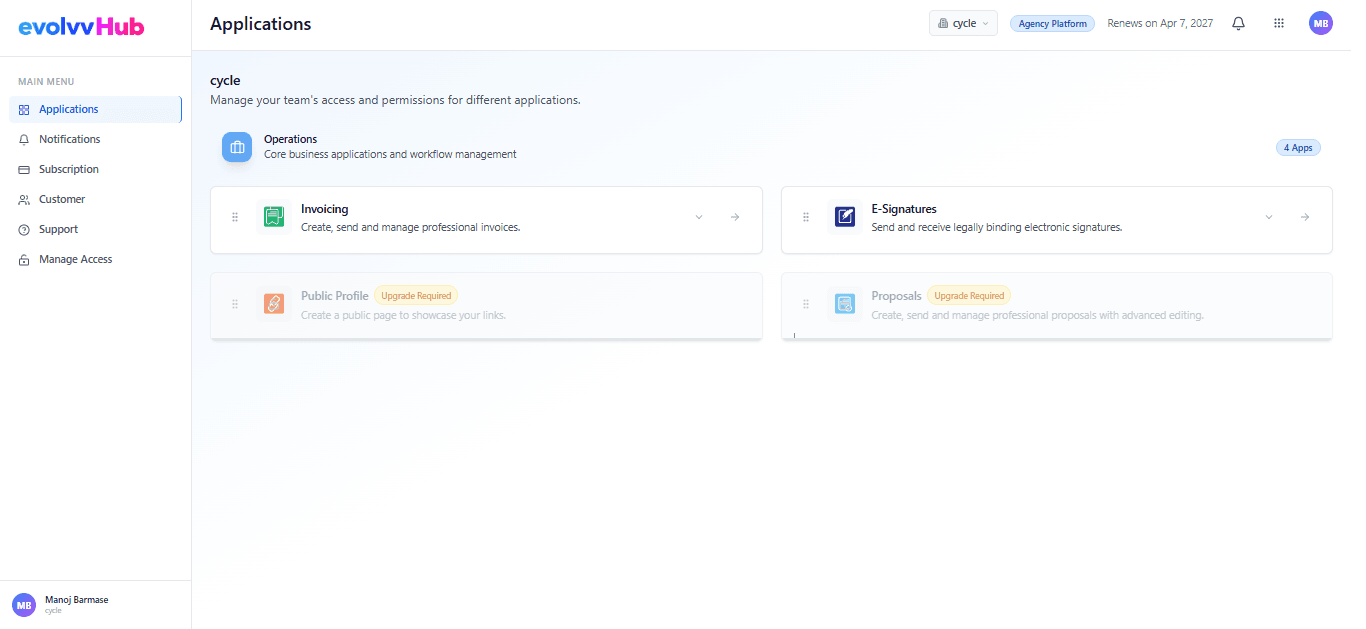
Here is what you will find in the Main Menu:
- Applications: Access your core tools like Invoicing, E-Signatures, and Proposals.
- Notifications: Stay updated on document statuses, payment receipts, and system alerts.
- Subscription: Manage your current plan, upgrade to premium features, and view billing history.
- Customer: Maintain a centralized directory of all your clients and their details.
- Support: Need help? Access our help desk or contact our support team directly.
- Manage Access: Invite team members and assign role-based permissions to different workspaces.
2. Accessing Core Operations
Evolvv is built to handle your end-to-end operational needs. From the Hub, you can instantly launch into our two primary modules:
🟢 Invoicing Create, send, and manage professional invoices. Track pending payments, generate delivery challans, and maintain your inventory seamlessly.
🟣 E-Signatures Say goodbye to printing and scanning. Send legally binding documents for signatures, track their status in real-time, and manage your custom templates.
3. Managing Your Workspaces
If you manage multiple businesses or departments, Evolvv allows you to switch between different Workspaces (e.g., from 'cycle' to 'aeroplane').
Look at the bottom left corner of your screen to see your active profile and current workspace. Clicking on it will allow you to switch contexts instantly without needing to log out.
What's Next? Now that you are familiar with the Hub, let's dive into creating your first document! 👉 Read Next: How to Create and Send Your First Invoice.